FHN
FHN 
Microsoft says attackers are creating fake Next.js projects to trick developers. These projects look normal and often appear as job assignments or coding tests. But once a developer opens or runs them, hidden code starts executing.
Instead of using obvious malware files, the attackers hide their code inside regular development tools like Visual Studio Code and Node.js. Everything looks like part of normal development work, which makes the attack harder to notice.
The issue first came to light when Node.js processes were seen making repeated outbound connections to suspicious servers over port 3000. These repeated connections raised red flags.
Security experts found that this is part of a larger campaign aimed directly at developers. The attackers use job-related themes so the repositories don’t look suspicious.
By tracking system and network activity, researchers traced the problem back to several Bitbucket repositories. Many of them followed similar naming patterns and reused the same structure and files. That confirmed they were connected to the same operation.
How the Malicious Code Gets Executed
There are three main ways the malicious code gets triggered
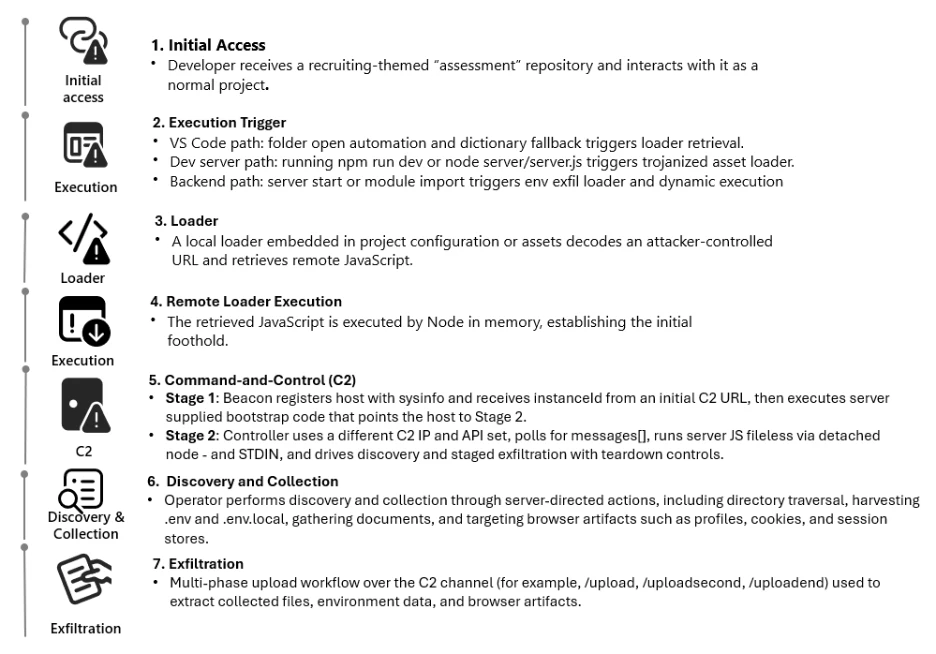
In some cases, the attack runs automatically when a developer opens the project in Visual Studio Code. A task is configured to execute as soon as the folder is trusted, which silently launches the hidden script.
In other cases, the attack starts when the developer runs the development server using commands like npm run dev. A file that looks harmless is actually modified to download and execute remote code.
The third method activates when the server starts. The malicious endpoint is hidden in environment variables. When the application launches, it connects to the attacker’s server, sends sensitive data, and runs remote code inside the Node.js process.
The first payload collects system details and keeps checking in with the attacker’s server using a unique ID. It can also download and run extra JavaScript directly in memory.
In the next stage, it becomes a long-running controller that connects to command-and-control servers and executes tasks using Node.js. It includes retry logic, error handling, and file upload endpoints to steal selected data while keeping the session active.
Mitigations
- Treat developer environments as a high-risk attack surface. Apply strict controls when working with unknown or untrusted repositories.
- Keep Visual Studio Code Workspace Trust and Restricted Mode enabled by default. Review files like
.vscode/tasks.jsonandnext.config.jsbefore trusting a project. - On Windows systems, enable Attack Surface Reduction rules in Defender for Endpoint. Turn on cloud-delivered protection and SmartScreen to block suspicious downloads.
- Monitor for unusual Node.js activity, especially repeated outbound connections to suspicious domains or C2 paths. Watch for risky code patterns such as
evalornew Functionin project files. - Use Microsoft Sentinel to build hunting queries and detection rules to identify abuse of Next.js projects and developer tools early.
About the Author