FHN
FHN 
A newer and more dangerous version of the ClickFix attack is now targeting Windows users, and it’s taking a smarter route than before. Earlier variants relied heavily on PowerShell or mshta, which many security tools already watch closely. This time, attackers are using built-in Windows tools like rundll32.exe and WebDAV to stay under the radar and avoid early detection.
Instead of obvious scripting activity, the attack blends into normal system behavior. This makes it harder for security teams to notice anything suspicious during the initial stages.
How the Attack Tricks Users
ClickFix still depends on social engineering. The attacker lures users to a fake website that looks like a CAPTCHA verification page. One such example is “healthybyhillary[.]com.”
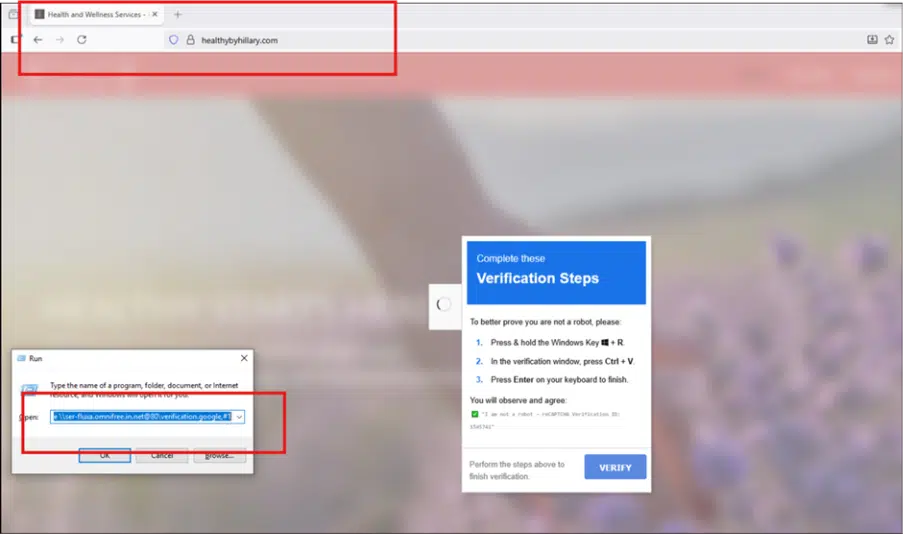
The page guides the user through a simple-looking process:
- Press Win + R to open the Run dialog
- Paste a pre-copied command using Ctrl + V
- Hit Enter to execute it
To an average user, this feels like a normal verification step. But in reality, it triggers a malicious command that starts the infection process.
How It Evades Detection
Once executed, the attack uses rundll32.exe along with WebDAV to pull a malicious DLL from a remote server. Since rundll32.exe is a trusted Windows tool, this activity often appears legitimate.
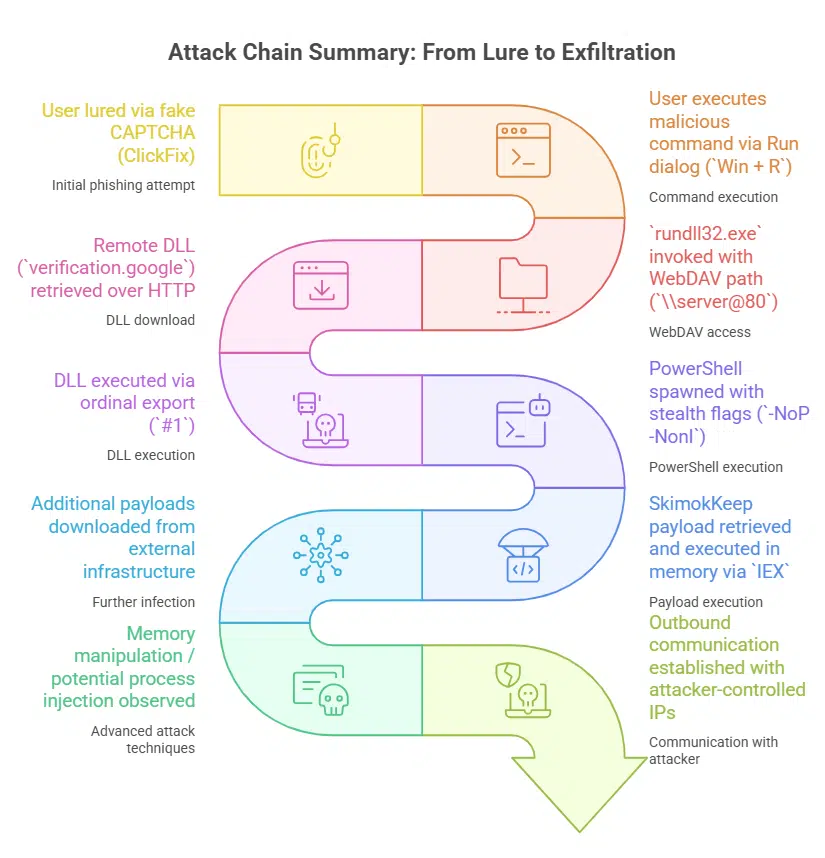
A few key techniques make this variant harder to detect:
- Uses WebDAV to fetch remote files like a network share
- Executes DLL functions using ordinal numbers (#1) instead of readable names
- Avoids early use of PowerShell to bypass common detection rules
- Runs most of the attack in memory, leaving minimal traces on disk
After the initial stage, PowerShell is used quietly with flags like -NoP and -NonI, along with IEX (Invoke-Expression) to load additional payloads.
The final payload, known as SkimokKeep, includes advanced evasion methods:
- Resolves system functions using hashing instead of direct imports
- Checks for sandbox or VM environments before running
- Uses anti-debugging tricks like timing checks
- Injects code into legitimate processes such as browsers
Why This Matters
This shift is significant because many defenses are still focused on detecting script-based attacks. By abusing trusted Windows components and reducing visible activity, attackers get a much quieter entry point.
Follow Us on:Linkedin, Instagram, Facebook to get the latest security news!
What Security Teams Should Watch
To detect or prevent this attack, organizations should focus on unusual system behavior rather than just scripts:
- Monitor suspicious use of rundll32.exe, especially with WebDAV-related arguments
- Enable command-line logging for system binaries (LOLBins)
- Restrict or monitor WebDAV traffic over port 80
- Block known malicious IPs and domains linked to the campaign
- Educate users about fake CAPTCHA pages and ClickFix tricks
This variant shows how attackers continue to adapt. The real risk isn’t just the malware itself—it’s how easily users can be convinced to launch it.
Block Known Malicious Infrastructure
Security teams should proactively block known indicators linked to this campaign to reduce exposure:
- 178.16.53[.]137
- 141.98.234[.]27
- 46.149.73[.]60
- 91.219.23[.]245
Suspicious domains to watch or block:
- mer-forgea.sightup[.]in[.]net
- data-x7-sync.neurosync[.]in[.]net
You can place this section right after the “What Security Teams Should Watch” section so it flows naturally as an action step.
About the Author