FHN
FHN 
Security researcher Dirk-jan Mollema has uncovered a new technique that could allow attackers to misuse Windows Hello for Business (WHFB) to authenticate to Microsoft Entra ID services without requiring the victim’s password, PIN, or biometric verification.
Rather than breaking Windows Hello encryption, the technique takes advantage of an already authenticated Windows session. If an attacker gains access to a logged-in device, they may be able to leverage the victim’s existing Windows Hello credentials to request authentication tokens and potentially establish long-term access to Microsoft Entra resources.
The research highlights how attackers can abuse trusted authentication mechanisms once an endpoint has already been compromised.
How the Attack Works
Windows Hello for Business replaces passwords with cryptographic keys that are securely stored on the user’s device, typically inside the Trusted Platform Module (TPM). These keys are designed to remain protected and cannot normally be exported from the device.
However, the research demonstrates that an application running with standard user privileges inside an active Windows session can request cryptographic operations from the Windows Hello key without asking the user to re-enter their PIN or biometric authentication.
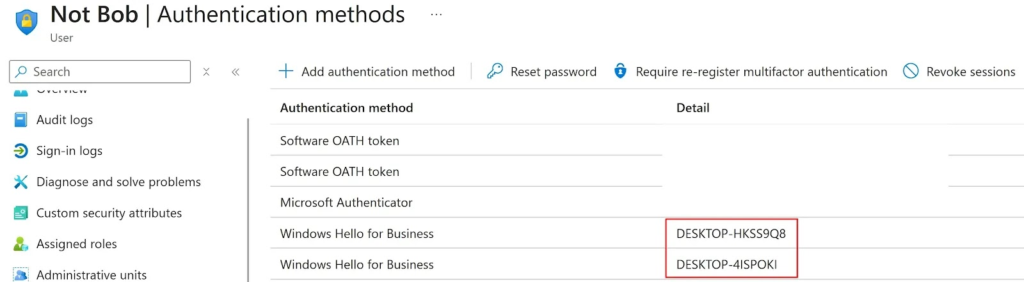
Instead of stealing the private key itself, the attacker simply instructs Windows to use it on their behalf. As long as the user remains logged in, Windows considers the authentication request valid.
This effectively allows attackers to “borrow” the trusted Windows Hello credentials without directly compromising them.
Authentication Without Traditional Credentials
Researchers showed that the borrowed Windows Hello key can be used during Microsoft’s WebAuthn authentication process.
Since the authentication challenge is not permanently tied to a specific device or session, attackers can generate the request from their own system while having the victim’s compromised device perform the required cryptographic signing.
Follow Us on:Linkedin, Instagram, Facebook to get the latest security news!
Once the challenge is successfully signed, Microsoft Entra treats the authentication as legitimate and issues cloud authentication tokens.
Unlike earlier attack techniques, this approach removes the need for attackers to control another Microsoft Entra-registered device, making exploitation significantly easier.
Potential Impact
Successful exploitation could provide attackers with access to Microsoft Entra cloud resources while using legitimate authentication mechanisms.
Depending on the organization’s security configuration, attackers may be able to:
- Authenticate to Microsoft Entra services.
- Obtain cloud authentication tokens.
- Register attacker-controlled devices.
- Add new authentication methods.
- Maintain persistent access to cloud identities.
- Expand access across enterprise environments.
Because Windows Hello for Business satisfies multi-factor authentication requirements, attackers may also bypass additional protections designed to secure identity management functions.
Why Organizations Should Pay Attention
The research demonstrates that passwordless authentication is only as secure as the endpoint itself.
Even though Windows Hello protects credentials from theft, an attacker who compromises an active Windows session may still abuse trusted authentication processes without ever knowing the user’s password or PIN.
This reinforces the importance of endpoint security alongside identity protection.
Organizations should not rely solely on passwordless authentication but should also focus on preventing attackers from gaining access to active user sessions.
Detection and Mitigation
Security teams should monitor Microsoft Entra sign-in activity for unusual Windows Hello authentication events, particularly those that do not contain an associated device ID.
Administrators should also investigate unexpected device registrations, monitor changes to authentication methods, strengthen endpoint detection and response capabilities, and regularly review Conditional Access policies to ensure only trusted devices can register new authentication factors.
Monitoring active user sessions and detecting suspicious endpoint activity remain critical for preventing attackers from abusing trusted authentication mechanisms.
Conclusion
Mollema’s research demonstrates that compromising an active Windows session can have serious consequences, even in environments that have adopted passwordless authentication.
While the technique does not break Windows Hello’s cryptographic protections, it shows how trusted authentication workflows can be abused after an endpoint has been compromised.
Organizations using Windows Hello for Business and Microsoft Entra should prioritize endpoint protection, continuous monitoring, and identity security controls to reduce the risk of attackers turning temporary access into persistent cloud compromise.
About the Author