FHN
FHN 
Cybercriminals are running a new malware campaign that targets macOS users searching online for instructions on installing Claude Code. Instead of exploiting software vulnerabilities, the attackers rely on social engineering and trusted websites to trick users into installing the MacSync infostealer.
The campaign shows how threat actors are increasingly abusing legitimate platforms like Google Ads and Claude AI to make malicious content appear trustworthy.
How the Attack Works
The attack begins with a sponsored Google advertisement for Claude Code. When users click the ad, they are taken to a genuine claude.ai page that appears to contain installation instructions.
However, the guide includes a hidden command that downloads malware instead of the legitimate software.
To make the attack harder to detect, the command:
- Uses encoded text to hide its real purpose.
- Silently downloads malicious files.
- Conceals the actual download location.
- Bypasses normal security checks during execution.
Because the page is hosted on a legitimate domain, many users may assume it is safe.
What MacSync Can Steal
Once installed, the MacSync infostealer collects sensitive information from the infected Mac, including:
- Saved passwords and Keychain data
- Browser cookies
- SSH keys
- Cloud service credentials
- Kubernetes configuration files
- Developer tokens
- Telegram session data
- Cryptocurrency wallet information
Researchers also found that the malware can modify Ledger Live, allowing attackers to continue stealing information even after the initial infection.
Why This Campaign Is Dangerous
Unlike traditional phishing attacks that rely on fake websites, this campaign uses real and trusted services to gain users’ confidence.
This makes the attack more convincing because:
- The advertisement appears in Google search results.
- The landing page uses a legitimate Claude AI domain.
- The installation steps closely resemble the official process.
- The malicious command is hidden using encoding techniques.
These tactics make it difficult for users to recognize the threat.
How to Stay Protected
To reduce the risk of infection:
- Download software only from official vendor websites.
- Avoid installing applications directly from sponsored search results.
- Carefully review any terminal commands before running them.
- Keep macOS and security software up to date.
- Use endpoint protection capable of detecting suspicious behavior.
Conclusion
This campaign demonstrates that attackers no longer need fake websites to spread malware. By abusing trusted platforms and disguising malicious commands, they can successfully target users who believe they are following legitimate installation instructions. As these techniques become more advanced, verifying installation sources and carefully reviewing terminal commands are becoming essential cybersecurity practices.
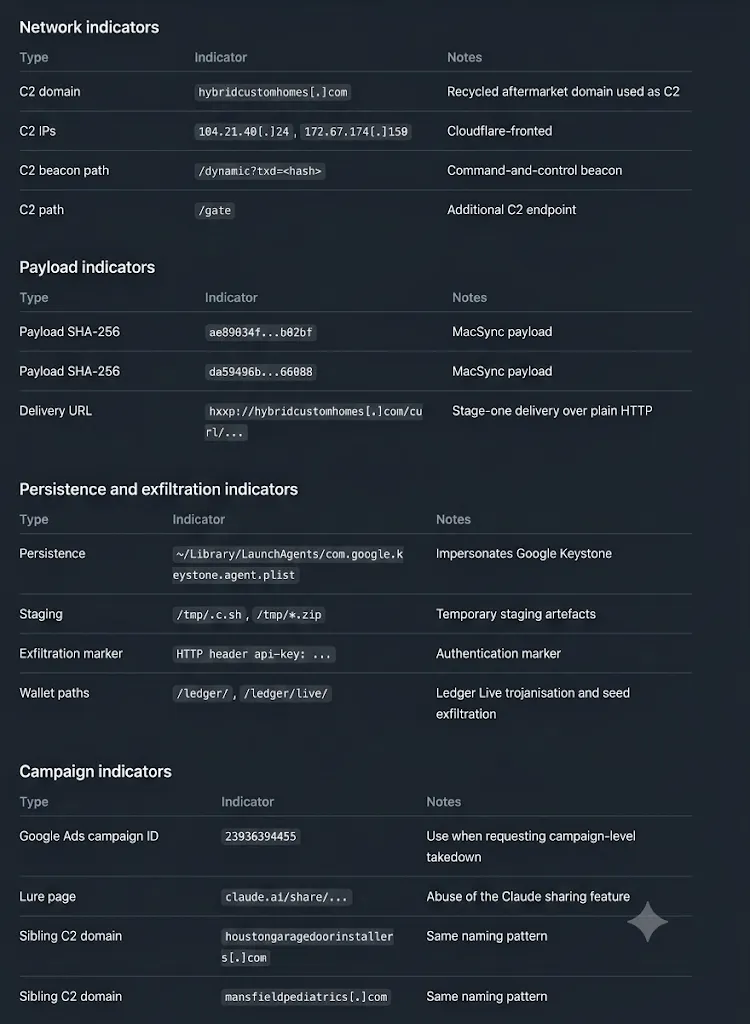
IOCs
About the Author