FHN
FHN 
Microsoft has discovered advanced phishing campaigns that misuse the normal behavior of the OAuth 2.0 authentication process.
Instead of exploiting software bugs or directly stealing passwords, attackers abuse trusted login flows used by platforms like Microsoft Entra ID and Google Workspace. This tactic allows them to bypass traditional email security systems and quietly redirect victims to malicious sites.
How the Attack Starts
The attack begins when threat actors create a malicious application inside their own cloud tenant. They configure the application’s redirect link to point to a domain controlled by the attackers.
To lure victims, attackers send phishing emails that appear legitimate. These messages often look like normal workplace requests.
Common phishing lures include:
- Fake e-signature requests
- Microsoft Teams meeting invitations
- Password reset alerts
- Account verification messages
When a victim clicks the link, a hidden OAuth authorization process begins.
How Attackers Bypass Detection
Attackers modify certain parameters in the OAuth request to trigger a silent authentication process.
Two parameters are commonly abused:
- prompt=none – forces the system to check the session without user interaction
- scope=invalid – intentionally triggers an authentication error
This forces the identity provider to redirect the user automatically. Because the redirection happens through a trusted identity provider, the link looks legitimate to users and security tools.
Follow Us on: Linkedin, Instagram, Facebook to get the latest security news!
Using the “State” Parameter for Deception
To make the attack look even more convincing, attackers abuse the OAuth state parameter.
Normally, this parameter is used to match authentication requests and responses. However, attackers encode the victim’s email address inside it.
Encoding methods used include:
- Base64
- Hex encoding
- Custom decoding schemes
When the victim lands on the phishing page, their email address is already filled in automatically, making the login page appear legitimate.
What Happens After Redirection
Once redirected, victims are sent to attacker-controlled infrastructure.
Two main outcomes have been observed:
Credential Theft
Victims are redirected to phishing frameworks such as EvilProxy that capture login credentials and session cookies.
Malware Delivery
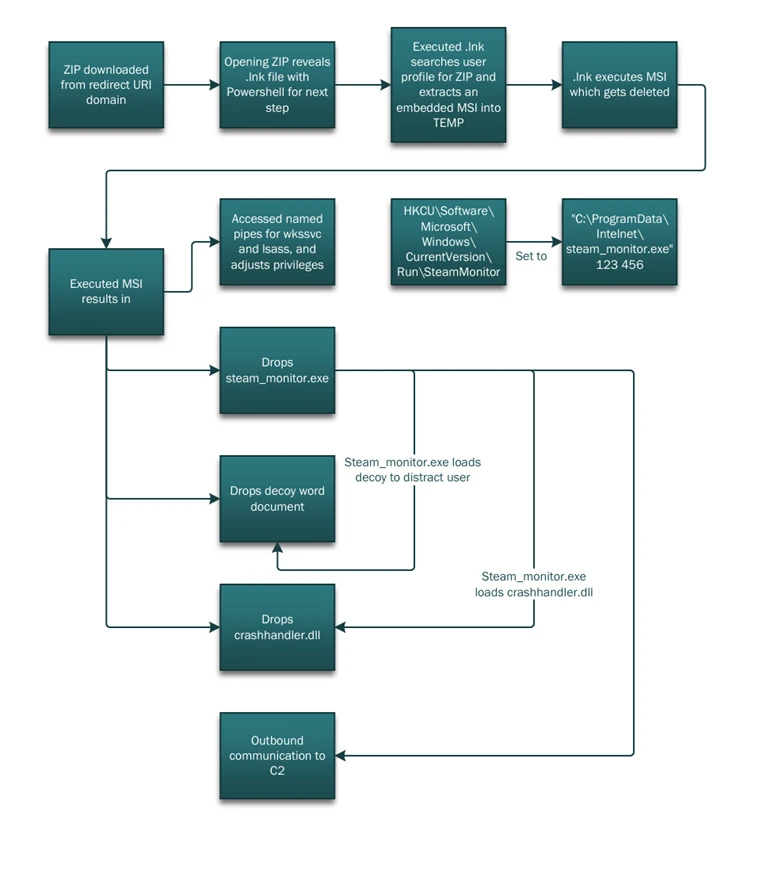
In some campaigns, the redirect automatically downloads a ZIP file. This archive contains a malicious shortcut that launches a PowerShell script.
The script performs several actions:
- Collects system information
- Extracts a legitimate executable file (steam_monitor.exe)
- Loads a malicious DLL (crashhandler.dll)
This technique allows attackers to run malicious code while appearing as legitimate software, ultimately connecting the infected system to an external command-and-control server.
Mitigation and Threat Indicators
This attack shows how threat actors can misuse normal OAuth authentication behavior instead of exploiting software bugs. Because the activity follows standard protocol rules, it can be harder for traditional security tools to detect.
Key Mitigation Steps
- Restrict user consent for third-party OAuth applications
- Regularly audit apps with excessive permissions
- Implement Conditional Access policies
- Enable strong identity protection controls
- Use XDR to monitor identity, email, and endpoint activity
- Monitor OAuth URL clicks with invalid scope parameters
- Watch for unusual downloads triggered after OAuth redirects
- Investigate suspicious PowerShell executions
- Detect unexpected DLL side-loading activit
IOCs
About the Author